
We Built an Agent That Publishes Our Website
Our marketing team publishes by chatting to a custom agent we built in Gemini Enterprise. How we use Gemini Enterprise, how we build custom agents, and the move off WordPress that made it possible.

Founder & Lead Google Cloud Architect
Our marketing team publishes to this website by opening a chat window and describing what they want. No CMS login. No Markdown. No Git. No developer, and no invoice.
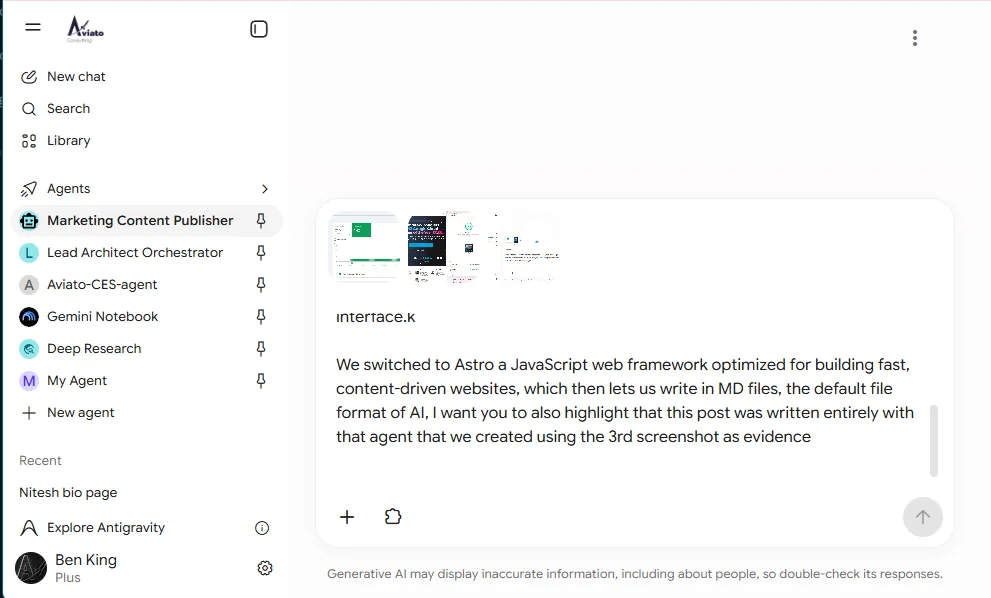
This post got here that way. Below is part of the prompt that wrote it, with the screenshots I attached for the agent to work from.
What the agent actually does
It’s built on Google Gemini Enterprise, with a set of tools wired up behind the chat interface:
- Templates. It reads the Markdown templates in our repo, so it knows the difference between a blog post, a case study and a service page, and which collection each one belongs in.
- Images. You paste screenshots into the chat. It converts them to sized
.webpfiles, writes the alt text, and drops them inpublic/images/. - Validation. It checks the frontmatter against the same Zod schemas the production build uses, plus our brand voice rules. Bad dates, missing descriptions and banned corporate words get caught before anything is committed.
- Git. It commits to a new branch, opens a pull request against
devand merges it there.
Getting to production is a separate step. I review what has landed on dev and merge it to main, and the site rebuilds in about two minutes.
The person writing the post never sees a terminal. They see a chat window and, at the end, a link to the pull request.
The interesting part is the guardrails, not the writing
Any model can write a blog post. Letting one commit to your website is a different problem, and that’s where most of the build went.
The agent can only ever push to dev, never main. It can’t touch protected index pages. It can’t invent a frontmatter field, because the schema rejects it and the build fails loudly rather than shipping broken metadata. Every change arrives as a pull request with a reviewable diff, so the rollback story is just Git.
That’s the difference between a chatbot and something you’d actually let near production. Constraints, and a human on the merge button. It’s the same pattern we use when we build AI agents for clients: give the model a narrow set of real tools, validate everything it produces, and keep a person in the loop at the point of no return.
How we use Gemini Enterprise
We didn’t build a new app for this, and that’s deliberate. The team already works in Gemini Enterprise every day, so the publisher is just another agent in the sidebar. If you look at the screenshot above, it sits next to the other agents we run, like our Lead Architect Orchestrator and Google’s Deep Research.
That’s the part people underestimate. A custom agent only gets used if it lives where people already work. Nobody on our marketing team had to learn a new tool, find a new login or ask IT for access. They picked an agent from a list and started typing.
Gemini Enterprise handles the parts you don’t want to build yourself: sign in, access control, enterprise data controls, and a chat interface that already handles pasted images. That leaves the interesting work, which is the agent’s tools and its guardrails.
Building custom agents, not buying chatbots
Off the shelf chat is good at answering questions. It’s not good at doing a specific job inside your systems, because it doesn’t know your templates, your schemas or your rules. A custom agent does, because you give it exactly those things as tools.
The recipe we use, for ourselves and for clients, is the same every time:
- Pick one job. “Publish a blog post” is a job. “Help with marketing” isn’t.
- Give it real tools for that job, and nothing else. Ours can read templates, convert images, validate and commit. It can’t do anything outside the website repo.
- Validate everything it produces against something that isn’t the model. For us that’s the Zod schemas and the build.
- Put a human at the point of no return. Here that’s the merge to
main.
Once you have one agent working like this, the next one is mostly a new set of tools on the same platform. If you want the deeper version of how we think about it, we’ve written about the four layers of an AI system, deploying ADK agents into Gemini Enterprise (back when it was still called Agentspace), and keeping agents reliable once they’re in production. For software teams, the same idea applied to delivery is agentic engineering.
Why WordPress made this impossible
We used to run on WordPress, and we were paying a developer roughly $80 to publish a single page. Not to design it. Not to write it. Just to add it.
It was also slow. Time to first byte was around a second, because every request went through PHP and MySQL. A dozen plugins each shipped their own CSS and their own copy of jQuery, and the homepage carried over 1MB of render blocking assets. Mobile pages took about four seconds to load.
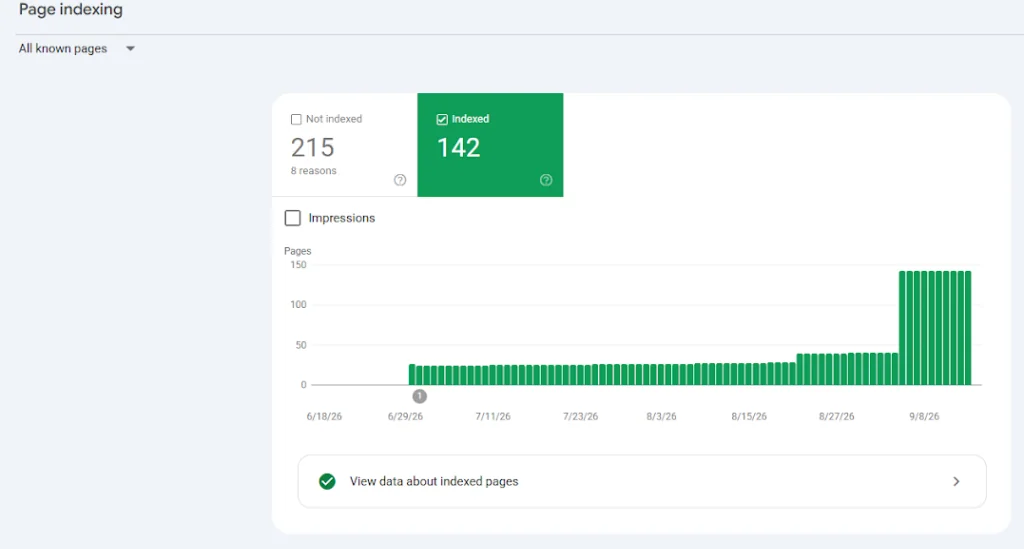
Google noticed. Search Console was full of “Crawled, currently not indexed”, which is what happens when your pages are slow and half the content only appears after JavaScript runs.
And you can’t point an agent at that. There’s no clean artefact to write, no schema to validate against, and a database that only a human with admin rights and an hourly rate can safely change.
Astro made it possible
We rebuilt on Astro. The thing that mattered most wasn’t speed, it was that content became files.
Markdown is the format models write natively. Frontmatter is typed and schema checked, so there’s a hard contract the agent has to satisfy. Git gives us review and rollback for free. The whole publishing pipeline turned into something a machine can operate and a human can audit.
The search results followed. Once the new site was live, the number of pages Google had indexed went from around 25 to 142.
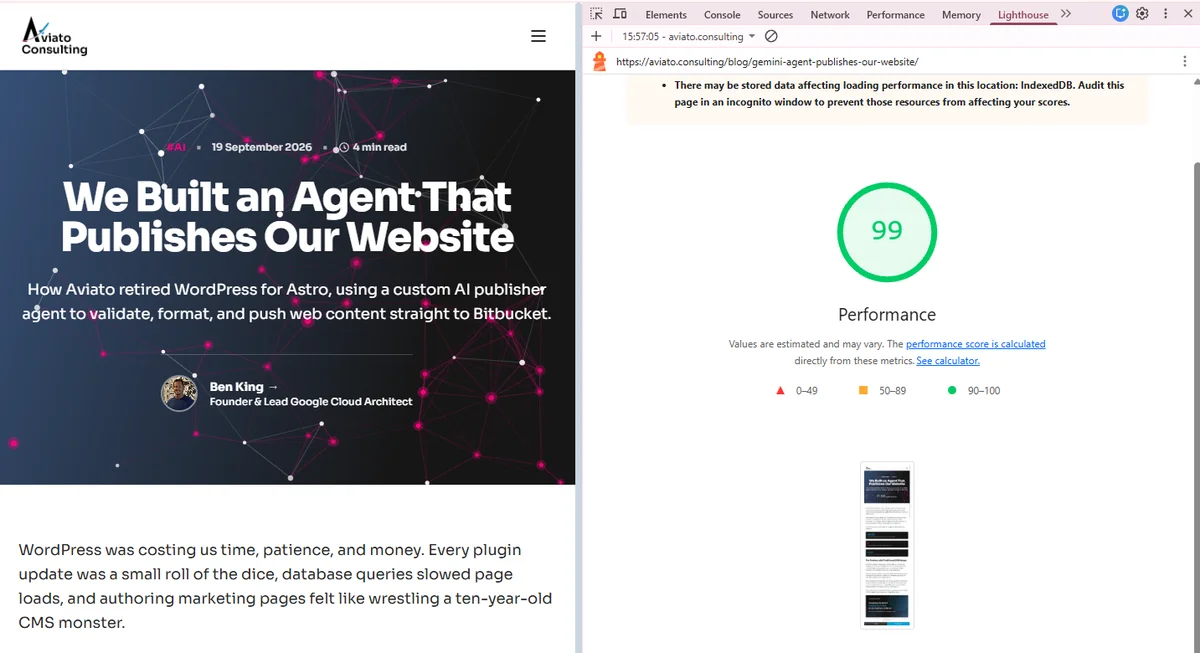
The speed came along for the ride. Astro ships zero JavaScript by default and pre renders every page, so there’s nothing for the browser to wait on. This page scores 99 for performance in Lighthouse.
Nice, but secondary. The reason we did it is that publishing now costs a chat message.
The architecture, service by service
There is no server. That’s the whole design, and everything else follows from it.
| Service | What it does here |
|---|---|
| Gemini Enterprise | Hosts the agent and the tools behind the chat window: read the templates, convert images, validate frontmatter, commit, open the pull request. |
| Cloud Build | The only path to production. A push to main triggers it, and it installs, validates, builds and deploys. |
| Firebase Hosting | Serves the built site from Google’s CDN, and owns the redirect table, the clean URLs and the security headers. |
| Cloud IAM | A dedicated deploy service account with four roles and nothing else. |
| Cloud Logging | Build logs. The pipeline sets CLOUD_LOGGING_ONLY, so there’s no bucket to manage. |
| Cloud Storage | Holds the source archive Cloud Build stages for each run. We only ever read it. |
That’s the entire footprint. No Compute Engine, no GKE, no Cloud Run, no Cloud SQL, no load balancer, no container registry. For a marketing site, all of that is machinery to patch rather than capability you use.
The pipeline itself is four steps:
npm cionnode:26.8.2-bookworm-slim, pinned exactly so a base image refresh can’t change the build underneath us.npm run check, which type checks and validates every content collection against its Zod schema. This is the step that catches a bad date or a missing description, and it’s the reason an agent can be trusted to write content at all.npm run build, producing a directory of static files.firebase deploy --only hosting.
Two details matter more than they look. The build runs on E2_HIGHCPU_8, because the validation and build steps are CPU bound and the machine costs cents per run. And the deploy is keyless: the Cloud Build service account holds roles/firebasehosting.admin directly, so there’s no FIREBASE_TOKEN in a secret store, no key to rotate, and nothing to leak. The account is deliberately not granted roles/editor or roles/owner.
How the site renders
Every page is rendered once, at build time, into a file. A request for /services/security-reviews/ is answered by a CDN returning an HTML document that was already complete before the request existed. No PHP, no database query, no server side render, no cold start. Time to first byte is a cache lookup.
What that buys, concretely:
- Zero JavaScript by default. Pages ship none. Interactive pieces are opted in individually: the currency selector on our pricing page, the delivery unit calculator, the carousels. Each is a few kilobytes, loaded only on the pages that use it. Nothing pulls in a framework runtime.
- Content as typed files. Markdown with schema checked frontmatter, compiled at build time. The same Zod schemas that reject the agent’s mistakes also generate the types our components use.
- Immutable asset caching. Hashed files under
/_astro/are served withmax-age=31536000, immutable, because a changed file gets a new name. Repeat visits fetch almost nothing. - Redirects at the edge. Retired URLs are 301s in the Hosting config, generated at build time from one map in
astro.config.mjs. They resolve before any file is served, so a moved page never costs the visitor a render. - Prefetching on intent. Links prefetch on hover, so the next page is usually in cache before the click lands.
The security headers sit in the same config: HSTS with preload, nosniff, frame options, a referrer policy, and a permissions policy that turns off camera, microphone and geolocation. They’re reviewed in the same pull request as the content, which is not true of a plugin based CMS.
Why Astro and Google Cloud fit together
Astro’s output is a directory. Firebase Hosting’s input is a directory. That’s the whole integration, and it’s why this stack has so few moving parts.
The deeper fit is that a static artefact removes the questions a marketing site should never have to answer. There’s no runtime to size, so there’s no autoscaling policy and no cold start. There’s no server process, so the attack surface is the CDN and the pipeline rather than an application. Rolling back is releasing the previous Hosting version, which takes seconds and needs no build. Traffic spikes are a CDN problem, which is to say not a problem.
It also means the interesting work moves to build time, where failures are cheap. A broken page fails a Cloud Build step and never reaches a visitor. On our old WordPress site, the same mistake was live the moment it was saved.
If you’re running a content site on a VM or a container because that’s what the CMS needed, the honest question is what the runtime is actually doing for you. For us the answer was: serving the same HTML over and over, slower, with more to patch.
Common questions
Can an AI agent safely publish to a production website?
Not directly, and it shouldn’t. Ours can only merge into dev. Production only changes when a person merges dev into main. Combined with schema validation on every field, the worst case is a bad draft sitting on dev, not a broken page in front of customers.
What is Google Gemini Enterprise?
It’s Google’s managed platform for running Gemini models against your own data and tools, with enterprise controls over access and data handling. It used to be called Agentspace. We use it to host the agent and connect it to our repo. More on how we roll it out for clients in Gemini Enterprise.
Can we build a custom agent like this for our own team?
Yes, and it doesn’t have to be for publishing. The same recipe works for any job with clear inputs, a system to act on and something to check the output against. That’s the work we do in AI agents.
Why Markdown rather than a headless CMS?
A headless CMS still puts an API and a UI between the model and the content. Markdown in Git is plain text with a typed schema, which is both the easiest thing for a model to write and the easiest thing for a human to review.
How long did it take to build?
The agent itself is a few tools and a well specified prompt. The real work was the migration off WordPress and getting the content schemas right. Once content is structured files, the agent is the easy bit.
If your marketing team is waiting on a developer
They shouldn’t be. If your content is in a database behind a per page invoice, the fix is structural: get content into files with a schema, then put an agent in front of it.
Founder of Aviato Consulting and former Google Cloud Consulting Lead for APAC. Ben specialises in enterprise cloud architecture, APRA CPS 234 compliance, and production agentic AI systems on Google Cloud.