
Service Extensions for Google Cloud App LB’s
If you run a website or app on Google Cloud and you’re using their Application Load Balancer to distribute traffic but wish you had a way to: Add or modify HTTP headers: Insert new headers for s

Founder & Lead Google Cloud Architect
If you run a website or app on Google Cloud and you’re using their Application Load Balancer to distribute traffic but wish you had a way to:
- Add or modify HTTP headers: Insert new headers for specific customers. Or re-write client headers on the way to the back end.
- Implement custom security rules: Add your own logic to block malicious requests or filter sensitive data.
- Perform custom logging: Log user-defined headers or other custom data into Cloud Logging or other tools.
- Rewrite HTML on the fly: Dynamically adjust your website content based on user location, device, etc
- Script Injection: Rewrite HTML for integration with Analytics or reCAPTCHA
Traditionally, you’d have to achieve this by setting up separate proxy servers or modifying your app. With Service Extensions, you can do all this directly within your Application Load Balancer.
How Service Extensions work:
- They are mini apps: Service Extensions are written in WebAssembly (Wasm), these are super fast, and secure.
- They run at the edge: This means they on the load balancer, reducing any potential impact to latency.
- They’re fully managed: Google Cloud takes care of all the hard parts.
Why would anyone use Service Extensions?
- Flexibility: Tailor your load balancer to your specific needs without complex workarounds.
- Performance: Improve response times by processing traffic at the edge.
- Security: Enhance your security posture with custom rules and logic.
- Efficiency: Reduce operational overhead by offloading tasks to the load balancer.
How to get started:
- Check the docs from Google, start with Service Extensions Overview then Plugins Overview and How to create a plugin finally some Code Samples
- Also definitely worth checking out WASM if you have not already at https://webassembly.org/
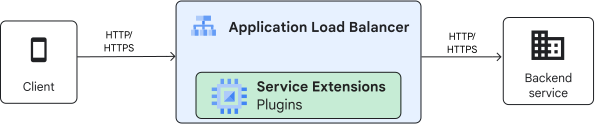
Service Extensions sit in the Cloud Load Balancing processing path.
Image to the left shows this.
Founder of Aviato Consulting and former Google Cloud Consulting Lead for APAC. Ben specialises in enterprise cloud architecture, APRA CPS 234 compliance, and production agentic AI systems on Google Cloud.